Blog

  • How Lane Keep Assist Works — 4 Essential Things Your Car Does to Keep You in Lane

    How Lane Keep Assist Works — 4 Essential Things Your Car Does to Keep You in Lane

    The Invisible Hands on Your Steering Wheel

    How Lane Keep Assist Works — And Why It Matters

    Have you ever been on a long highway drive, late at night, and felt your car drifting slightly toward the edge of the lane? Maybe you were tired. Maybe you glanced at your phone for a second. Now imagine if your car could gently nudge itself back into the lane — without you doing anything.

    That’s exactly what Lane Keep Assist (LKA) does. It’s one of the most important ADAS (Advanced Driver Assistance Systems) features in modern cars, and understanding how lane keep assist works can change the way you think about driving safety.

    In my previous blog on How Adaptive Cruise Control Works, we explored how your car manages speed automatically. Lane Keep Assist is the other half of the equation — it manages steering. When you combine ACC with LKA, you get Level 2 autonomy — the car handles both speed and direction.

    This post breaks down how lane keep assist works from the camera behind your windshield to the electric motor in your steering column. And yes, there’s a Geek Zone for those who want the computer vision details.

    What Is Lane Keep Assist?

    Lane Keep Assist is a driver assistance feature that uses a forward-facing camera to detect lane markings on the road. When the system sees that your car is drifting towards a lane boundary without the turn signal being activated, it intervenes — either by warning you or by applying a gentle steering correction to guide you back.

    Think of it as an invisible co-pilot with their hand lightly on the wheel, ready to nudge you back if you start drifting.

    But here’s an important distinction that most people miss — there are actually three different levels of lane assistance, and they’re not the same thing.

    Lane Departure Warning vs Lane Keep Assist vs Lane Centering

    1. Lane Departure Warning (LDW) — The Alert System

    This is the most basic version. LDW simply warns you when you’re about to leave your lane. The warning can be a beep, a steering wheel vibration, or a visual alert on the dashboard. But it doesn’t steer. It’s entirely up to you to correct.

    2. Lane Keep Assist (LKA) — The Gentle Nudge

    LKA takes it a step further. When it detects you’re drifting, it applies a gentle steering torque through the Electric Power Steering (EPS) system to guide you back into the lane. It’s not aggressive — it’s more like a soft suggestion from the car. You can always override it by steering normally.

    3. Lane Centering Assist (LCA) — The Full Experience

    This is the most advanced version. Instead of just reacting when you drift, LCA actively keeps you centered in the lane at all times. It provides continuous steering input, handles gentle curves, and works alongside Adaptive Cruise Control to deliver a semi-autonomous driving experience. This is what cars like the XUV700 and Hyundai Tucson offer in their top trims.
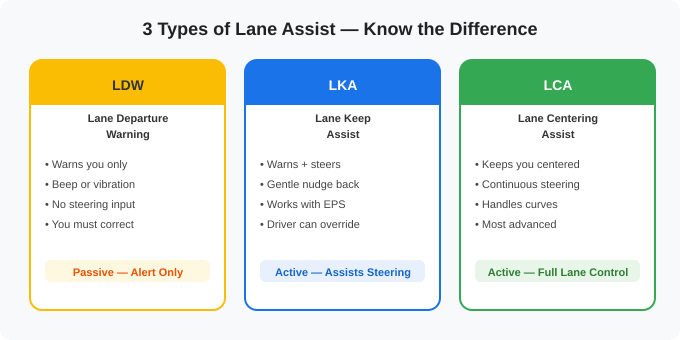
    Lane departure warning vs lane keep assist vs lane centering assist comparison diagram

    Figure 1: The Three Levels of Lane Assistance — LDW vs LKA vs LCA

    How Lane Keep Assist Works — Step by Step

    The magic of lane keep assist comes down to four components working together in a continuous loop: a camera, an image processor, a decision engine, and the electric power steering motor.

    Step 1: The Camera Scans Lane Markings

    A forward-facing camera, usually mounted behind the windshield near the rearview mirror, continuously captures video of the road ahead. The camera is looking for one thing — lane markings. White lines, yellow lines, solid or dashed — the camera scans both sides of your lane to understand where the boundaries are.

    Step 2: Image Processing Detects the Lane

    The raw camera feed is processed by an onboard computer using image processing algorithms. The system converts the image to grayscale, detects edges (sharp brightness changes), focuses on the road region, and identifies straight or curved lines that represent lane markings. This happens in real-time, processing 30 or more frames every second.

    Step 3: The ECU Calculates Your Position

    The Electronic Control Unit (ECU) now knows where the lane boundaries are and where your car is positioned relative to them. It calculates the offset — how far your car is from the center of the lane. If the offset is within acceptable limits, no action is taken. If the offset exceeds a threshold (meaning you’re drifting), the system decides to intervene.

    Step 4: EPS Applies Corrective Steering

    If you’re drifting without your turn signal on, the system sends a command to the Electric Power Steering (EPS) motor. The EPS adds a small steering torque — a gentle nudge — that turns the wheels slightly to bring you back toward the center. This is called a torque overlay because it overlays a correction on top of whatever steering input you’re already providing.

    If you resist the nudge (by actively steering in the opposite direction), the system understands you’re intentionally changing lanes and backs off.
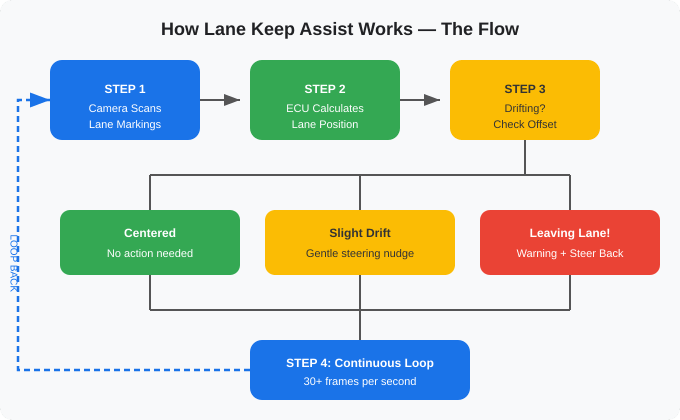
    How lane keep assist works - decision flow diagram showing camera scan, ECU calculation, drift detection, and EPS steering correction loop

    Figure 2: The Lane Keep Assist Decision Loop — Scan, Calculate, Decide, Correct, Repeat

    How the Camera Detects Lane Lines

    The camera behind your windshield doesn’t “see” lane lines the way you do. It sees pixels — millions of brightness values arranged in a grid. The system needs to convert those pixels into useful information: where are the lane boundaries?

    Here’s the simplified pipeline:

    1. Grayscale Conversion: The color image is converted to grayscale because lane detection relies on brightness contrast, not color.

    2. Edge Detection: An algorithm (typically Canny edge detection) identifies pixels where brightness changes sharply — these are the “edges” in the image. Lane markings, being bright white or yellow against dark road, create strong edges.

    3. Region of Interest: The system ignores the sky, trees, and buildings by focusing only on the lower portion of the image where the road is. This reduces processing load and false detections.

    4. Line Detection: A mathematical technique called the Hough Transform converts the detected edges into lines. It identifies which edges form straight or curved lines — those are your lane markings.
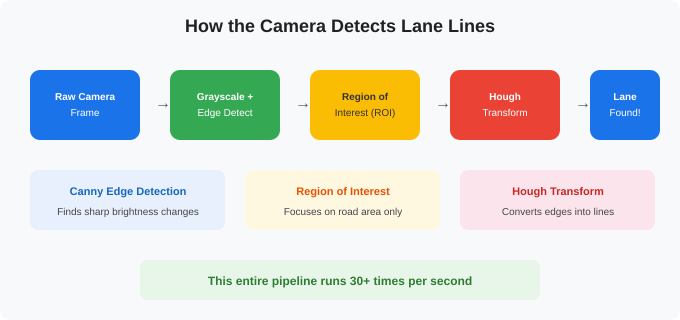
    Lane detection pipeline - camera frame to grayscale to Canny edge detection to Hough transform

    Figure 3: The Lane Detection Pipeline — From Raw Camera Frame to Lane Lines

    This entire pipeline runs 30 or more times per second, giving the system a continuously updated picture of where the lanes are and where your car is positioned within them.

    How Lane Keep Assist Steers Your Car — The EPS Torque Overlay

    Once the system decides you’re drifting, it needs to physically steer the car. This is where the Electric Power Steering (EPS) system becomes crucial.

    Modern cars use EPS instead of traditional hydraulic power steering. EPS has an electric motor attached to the steering column or rack. Normally, this motor assists your steering — it’s why turning the wheel feels light and easy.

    Lane Keep Assist cleverly uses this same motor. When the system detects a drift, the ECU sends a torque overlay command to the EPS motor. The motor adds a small amount of steering torque — typically just 1 to 3 Newton-meters — in the direction needed to bring the car back. This is gentle enough that you barely feel it, but firm enough to correct the drift.

    The beauty of the torque overlay approach is that it works alongside your steering, not against it. If you actively steer (indicating you want to change lanes), your input force easily overrides the system’s correction. The system never fights you.
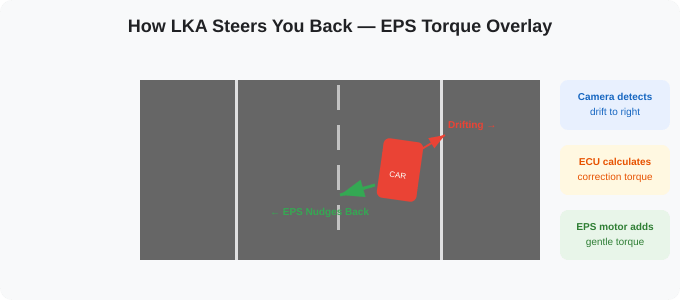
    How EPS torque overlay steers the car back when lane keep assist detects drift

    Figure 4: How EPS Applies Corrective Torque When You Drift

    💡 Fun fact: In cars without electric power steering, some older LKA systems achieved the same effect by braking individual wheels using the ESP (Electronic Stability Program). Braking the right wheel slightly would pull the car to the right, and vice versa. Clever engineering!

    Lane Keep Assist + Adaptive Cruise Control = Level 2 Autonomy

    Here’s where lane keep assist becomes truly powerful. On its own, LKA is a Level 1 feature — it handles lateral control (steering) but not longitudinal control (speed). ACC, which we covered in the previous blog, is also Level 1 — it handles speed but not steering.

    But when you combine LKA and ACC together, the car manages both speed and steering simultaneously. That’s Level 2 autonomy under the SAE classification. Your car is now handling the two most fundamental driving tasks — going straight and going the right speed — while you supervise.

    This is exactly what cars like the Mahindra XUV700, Tata Harrier, MG Astor, and Hyundai Tucson offer in India. You engage ACC, the lane centering kicks in, and the car essentially drives itself on a well-marked highway. Your job is to supervise, keep your hands lightly on the wheel, and take over when needed.

    ⚠️ Level 2 is NOT self-driving. You must remain alert at all times. The system can handle routine driving, but unexpected situations — construction zones, unmarked roads, sudden obstacles — still need a human driver.

    Does Lane Keep Assist Work on Indian Roads?

    This is the question that matters most if you’re reading this from India. Let me be straightforward — lane keep assist has a tougher time on Indian roads compared to ACC.

    Where Lane Keep Assist Works Well in India

    National Expressways: The Mumbai-Pune Expressway, Yamuna Expressway, Bangalore-Mysore Expressway — these have well-painted, clearly visible lane markings. LKA works beautifully here. On a long expressway drive, it genuinely reduces fatigue by keeping you centered without constant micro-corrections.

    New National Highways: Many newly built NH sections have good lane markings that LKA systems can detect. If the paint is fresh and visible, the camera picks it up well.

    Where Lane Keep Assist Struggles in India

    Faded or missing lane markings: This is the biggest challenge. LKA fundamentally depends on visible lane lines. Many Indian roads — even some national highways — have faded, worn, or completely missing markings. No lines means the camera sees nothing, and LKA simply switches off.

    Construction zones: Temporary lane changes, missing markings, and confusing barriers can confuse the system. It may provide incorrect steering inputs or disengage entirely.

    Poorly lit roads at night: Cameras need light to see. On unlit rural highways, the camera may struggle to detect lane markings even if they exist.

    Rain and fog: Heavy monsoon rain reduces camera visibility significantly. Water on the road can also create reflections that confuse lane detection algorithms.

    Multi-lane chaos: In India, lanes are often treated as suggestions. When vehicles around you are straddling lanes or driving between markings, LKA can get confused about which lane you’re actually in.

    🇮🇳 India-specific tuning: Some manufacturers like Renault (with the 2026 Duster) and Mahindra are now tuning their ADAS systems specifically for Indian road conditions. This includes training algorithms on Indian traffic data and adjusting sensitivity thresholds for poorly marked roads.

    Indian Cars with Lane Keep Assist in 2026

    Lane Keep Assist is now available across a growing range of cars in India, not just luxury models:

    Mahindra XUV700 — Level 2 ADAS with Lane Keep Assist, Lane Departure Warning, and Traffic Sign Recognition.

    Tata Harrier & Safari — ADAS suite in higher trims includes LKA and LDW.

    Hyundai Creta & Tucson — SmartSense package with Lane Keeping Assist and Lane Following Assist.

    MG Astor — Level 2 ADAS with Lane Keep Assist and Lane Departure Warning.

    Honda City & Elevate — Honda SENSING suite includes Lane Keeping Assist System (LKAS).

    Kia Seltos & Sonet — ADAS package with LKA in higher variants.

    Renault Duster 2026 — 17 India-specific ADAS features including LKA, tuned for local conditions.

    GEEK ZONE — For the Technically Curious

    If you want the technical details behind lane keep assist, this section is for you. We’ll cover the computer vision pipeline, the math behind lane detection, and how the steering correction is controlled.

    The Computer Vision Pipeline — In Detail

    Lane detection uses classical computer vision techniques. Here’s what happens inside the onboard processor:

    Canny Edge DetectionNamed after John Canny (1986), this algorithm identifies edges by finding areas where pixel intensity changes rapidly. It uses gradient calculation (Sobel filters) followed by non-maximum suppression and hysteresis thresholding to produce clean edge maps. The thresholds are typically tuned for road conditions — high-contrast white markings on dark asphalt produce strong edges.

    Region of Interest (ROI): The algorithm masks out everything except the trapezoidal region where the road is expected to appear. This typically covers the lower 40–60% of the image, narrowing toward the vanishing point. This dramatically reduces false positives from detecting edges in trees, buildings, or the sky.

    Hough TransformThis is the mathematical backbone of lane detection. The Hough Transform converts edge points from Cartesian space (x, y) into parameter space (ρ, θ), where ρ is the perpendicular distance from the origin to the line, and θ is the angle. Points that lie on the same line in image space accumulate in the same location in Hough space. By finding peaks in the Hough accumulator, the system identifies the dominant lines — which are the lane markings.

    Modern systems have moved beyond basic Hough Transform to use Probabilistic Hough Transformwhich is faster and handles dashed lines better. Some premium systems now use deep learning-based lane detection (convolutional neural networks) that can detect lane boundaries even without painted markings, using road edges, curbs, and texture differences.

    Processing Speed and Accuracy

    A typical lane detection system processes each frame in about 25–35 milliseconds (28ms average in research benchmarks), achieving approximately 30–40 FPS. Accuracy on well-marked highways reaches 96%+ for straight lane detection using Hough Transform-based methods. Curved lane detection accuracy is lower, around 85–90%, which is why some systems use polynomial fitting (fitting a second or third-degree polynomial curve) instead of straight lines for curved roads.

    EPS Torque Control — The Numbers

    The corrective torque applied by LKA through the EPS motor is carefully limited. Typical values:

    Maximum corrective torque: 2–5 Nm (Newton-meters) — enough to guide but not overpower the driver.

    Response time: 50–200 milliseconds from drift detection to steering correction.

    Minimum operating speed: 60–65 km/h for most systems (some work from 40 km/h). Below this, the system disengages because lane changes are frequent in city driving.

    Driver override: The driver can override with approximately 2–3 Nm of counter-torque — basically just normal steering force. The system detects this through the EPS torque sensor and immediately backs off.

    The control algorithm uses a PID controller (similar to what ACC uses) to smoothly apply and release the corrective torque. The Proportional component responds to the current offset, the Integral component prevents steady-state drift, and the Derivative component ensures smooth transitions without jerky corrections. Some newer systems use neural network-tuned PID gains that adapt to driving conditions and road curvature.

    Camera Specifications

    The forward-facing camera used for lane detection typically operates with these specs:

    Resolution: 1280×960 or higher (some use 1920×1080 for better accuracy).

    Frame rate: 30 FPS minimum, some systems run at 60 FPS.

    Field of view: Approximately 50–55 degrees horizontal, focused on the road ahead.

    Detection range: 40–80 meters ahead, depending on camera quality and mounting position.

    Mounting: Behind the windshield, near the rearview mirror, angled slightly downward.

    Some advanced systems use stereo cameras (two cameras side by side) to gain depth perception. Subaru’s EyeSight is a well-known example. Stereo vision allows the system to estimate not just the position of lane lines but also their distance from the vehicle, improving accuracy on curves and at higher speeds.

    Why Lane Keep Assist Needs Good Lane Markings

    The fundamental limitation of vision-based LKA is that it relies on painted lane markings being visible to the camera. The contrast ratio between the marking and the road surface needs to be sufficiently high for the edge detection algorithm to identify it reliably. When markings are faded (low contrast), partially obscured (rain, dirt), or absent altogether, the system has no reference point — and it simply disengages.

    This is a known weakness globally, but it’s especially challenging in India where road marking maintenance varies dramatically between expressways and regular highways. This is why the industry is moving toward HD map-based lane positioning and deep learning-based road edge detection — technologies that can estimate lane position even without painted markings, using road edges, barriers, and contextual cues.

    Key Takeaways

    Lane Keep Assist uses a forward-facing camera and image processing algorithms (Canny edge detection + Hough Transform) to detect lane markings in real time, processing 30+ frames per second.

    When you drift without signaling, the system applies a gentle corrective torque through the Electric Power Steering motor — typically 2–5 Nm — to nudge you back into the lane.

    There are three levels: Lane Departure Warning (alert only), Lane Keep Assist (warning + gentle correction), and Lane Centering (continuous active centering).

    Combining LKA with ACC gives you Level 2 autonomy — the car handles both speed and steering while you supervise.

    On Indian roads, LKA works best on expressways with clear markings. Faded or missing lane lines, heavy rain, and chaotic traffic remain challenges.

    Final Thoughts

    Writing this post — and the ACC one before it — has given me a deeper appreciation for how much engineering goes into features we take for granted. The idea that a small camera behind your windshield can capture 30 images per second, run edge detection algorithms, identify mathematical lines using the Hough Transform, calculate your position within the lane, and send a corrective signal to an electric motor in your steering column — all in under 35 milliseconds — is remarkable.

    And when you combine this with Adaptive Cruise Control, your car is simultaneously managing radar waves for speed control and camera vision for lane positioning. Two entirely different sensing technologies, working together, to give you a semi-autonomous driving experience.

    If you’re buying a car in 2026, look for one with both ACC and Lane Keep Assist. Not because it’s a fancy spec-sheet feature, but because on that one long night drive when your attention fades for a second, this system might be the difference between a safe trip and a disaster.

    Stay in your lane. Or let the car do it for you.

    If you haven’t read the ACC post yet, start there — it’s the other half of Level 2 autonomy.

    Good day to you 🫡.
  • How Adaptive Cruise Control Works – 5 Essential Things Every Driver Must Know

    How Adaptive Cruise Control Works – 5 Essential Things Every Driver Must Know

    Your Car’s Invisible Co-Driver, Explained

    What Does Adaptive Cruise Control Feel Like?

    Just like how I debugged my wireless mouse lag issue, understanding how systems work under the hood changes your perspective.

    Ever wondered how adaptive cruise control works?.

    Imagine this. You’re on the Chennai–Bangalore expressway, it’s 6 AM, the road is smooth, and you’re cruising at 100 km/h. A truck ahead is doing 70. Your foot moves to the brake… but wait. The car has already slowed down on its own.

    No beep. No panic. The car quietly reduced speed, matched the truck’s pace, kept a safe gap, and the moment the truck moved to the left lane, your car silently accelerated back to 100.

    That’s Adaptive Cruise Control (ACC) doing its thing. And honestly, until I dug into how this works, I had no idea how beautifully engineered this system is.

    This blog is my attempt to understand ACC from the ground up — the sensors, the brains, the decision-making — and explain it in a way that both a curious teenager and a petrol head can enjoy. And yes, there’s a Geek Zone for those who want the technical numbers.

    Cruise Control vs Adaptive Cruise Control — What’s the Difference?

    Before we talk adaptive, let’s talk basic. Regular cruise control has been around since the 1950s. Here’s what it does: you set a speed, say 80 km/h, and take your foot off the accelerator. The car maintains that speed.

    Simple. Useful. But also, a bit dumb.

    Because if a slower vehicle appears ahead, regular cruise control doesn’t care. It will happily keep pushing 80 km/h straight into the back of that vehicle. YOU must brake. YOU must cancel cruise. YOU must re-engage it once the road is clear.

    Now think about doing this repeatedly on a 4-hour highway drive. That’s exhausting.

    💡 Think of it this way: Regular cruise control is like setting an alarm — it rings at the same time no matter what. Adaptive cruise control is like a smart alarm that checks your calendar and adjusts itself.

    How Adaptive Cruise Control Works — Step by Step

    Adaptive Cruise Control (ACC) is the evolved version. You still set a speed. But now, you also set a following distance — how far you want to stay behind the car in front.

    The system then uses sensors (radar, cameras, or both) to constantly monitor the vehicle ahead. If that vehicle slows down, your car slows down automatically. If the road clears up, your car speeds back up to the set speed. All without you touching a pedal.

    Some advanced systems even handle stop-and-go traffic — they’ll bring your car to a complete stop in a jam and start moving again when traffic flows. This is a massive comfort upgrade on Indian expressways where you might encounter a sudden toll plaza backup.

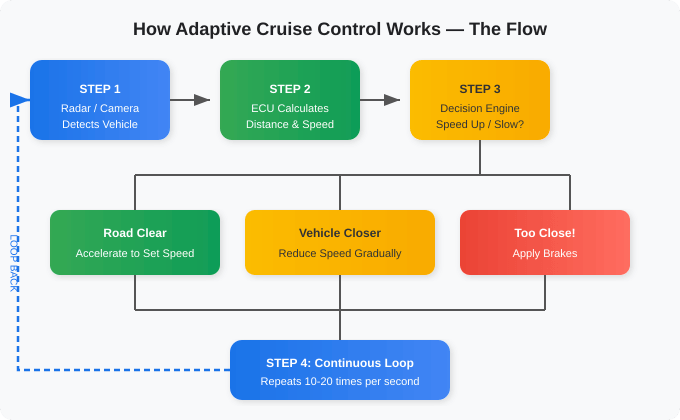
    How adaptive cruise control works - decision flow diagram showing sensor detect, ECU calculate, and speed adjustment loop

    Figure 1: The ACC Decision Loop — Sense, Calculate, Act, Repeat

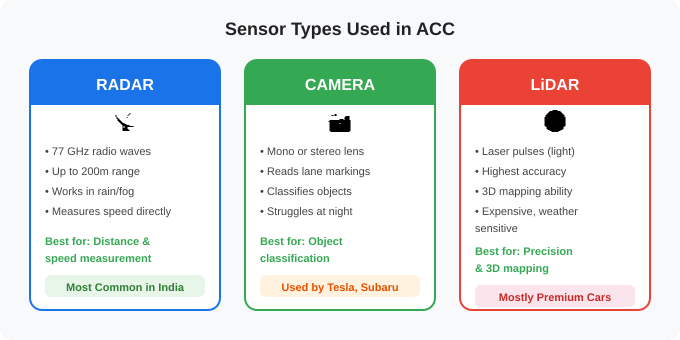
    Sensors Used in Adaptive Cruise Control — Radar, Camera & LiDAR

    ACC isn’t magic. It’s science. And the science starts with sensors. Your car needs to “see” the road ahead, and there are three main ways it does this.

    1. Radar — The Workhorse

    Most ACC systems, especially in Indian cars like the Mahindra XUV700, Tata Harrier, or Hyundai Creta, use a radar sensor mounted behind the front bumper or grille. This radar sends out radio waves that bounce off the vehicle ahead and return. The system calculates how far away the vehicle is and how fast it’s moving based on the time delay and frequency shift of the returned signal.

    Radar is the preferred choice for ACC because it works reliably in rain, fog, dust, and even at night — conditions that cameras alone struggle with.

    2. Camera — The Observer

    A forward-facing camera, usually mounted near the rearview mirror, provides visual data. It can read lane markings, identify vehicle types, and even recognize traffic signs. While cameras alone can run ACC (Subaru’s EyeSight and Tesla’s Vision are camera-only systems), they don’t perform as well in poor visibility.

    3. LiDAR — The Premium Option

    LiDAR (Light Detection and Ranging) uses laser pulses to create a precise 3D map of the surroundings. It’s the most accurate but also the most expensive, which is why you’ll mostly find it in premium or autonomous driving test vehicles. For most consumer ACC systems in India, radar plus camera is the standard combo.

    Adaptive cruise control sensor types comparison - radar vs camera vs LiDAR

    Figure 2: The Three Sensor Types Used in ACC Systems

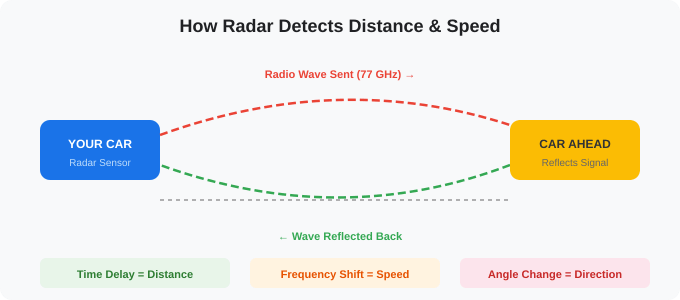
    How Radar Detects Distance and Speed in ACC

    Since radar is the backbone of most ACC systems, let’s understand how it works.

    The radar sensor emits radio waves at a specific frequency. These waves travel at the speed of light, hit the vehicle ahead, and bounce back. By measuring the time it takes for the wave to return, the system calculates distance. And by measuring the change in frequency of the returned wave (this is called the Doppler effect — the same reason an ambulance siren sounds different as it approaches vs. moves away), the system calculates relative speed.

    How radar measures distance and speed in adaptive cruise control using radio wave reflection

    Figure 3: How Radar Measures Distance and Speed Using Wave Reflections

    This combination of distance + speed + direction is enough for the system to make intelligent decisions about whether to maintain speed, slow down, or brake.

    The ECU — How Your Car’s Brain Makes ACC Decisions

    Sensors are the eyes. But the brain of the operation is the Electronic Control Unit (ECU) — a small but powerful computer that processes all the sensor data in real-time.

    Here’s what happens inside the ECU in a fraction of a second:

    1. Data In: Radar sends distance, speed, and angle data. Camera adds object classification (is it a car? truck? motorcycle?).

    2. Compare: The ECU compares the current gap with the driver’s set following distance.

    3. Decide: If the gap is shrinking, slow down. If the gap is growing or the road is clear, speed up to the set speed.

    4. Execute: The ECU sends commands to the throttle (to accelerate) or the braking system (to decelerate). In modern cars, this is done electronically through drive-by-wire systems.

    5. Repeat: This entire cycle runs 10 to 20 times every second, creating a smooth, continuous adjustment that feels natural to the driver.

    🚗 The beauty of ACC is that you, the driver, don’t feel the computation. You just feel the car gently slowing down or speeding up as if it’s reading your mind. But behind the scenes, hundreds of calculations are happening every second.

    Does Adaptive Cruise Control Work on Indian Roads?

    Now here’s where things get interesting. ACC was designed primarily for well-marked highways with disciplined traffic. Indian roads… are a different story.

    Where ACC Shines in India

    Expressways: On the Mumbai-Pune Expressway, Chennai-Bangalore Highway, or Yamuna Expressway, ACC is genuinely useful. Traffic flow is relatively predictable, and the system handles highway cruising beautifully.

    Long drives: On a 6-hour highway drive, ACC significantly reduces fatigue. Your right foot gets a break from the constant accelerate-brake cycle.

    Where ACC Struggles in India

    Chaotic city traffic: Auto-rickshaws cutting in, two-wheelers weaving, pedestrians crossing — most ACC systems aren’t designed for this level of unpredictability. The system may brake too aggressively or too late.

    Poorly marked roads: Camera-based lane detection needs visible lane markings. Many Indian highways still lack consistent markings, especially in rural stretches.

    Dust and rain: While radar handles weather better than cameras, heavy dust on sensor covers or monsoon rain can occasionally affect performance.

    Sudden cut-ins: When a vehicle suddenly cuts into your lane at close range, the system has very little time to react. This is common on Indian roads where lane discipline is, let’s say, a suggestion rather than a rule.

    ⚠️ Important: ACC is a driver ASSIST feature, not a self-driving feature. You must always keep your hands on the wheel and your eyes on the road. ACC reduces workload — it doesn’t replace the driver.

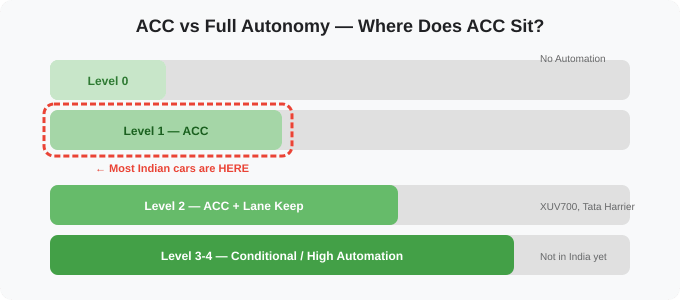
    ACC in the Bigger Picture — Levels of Automation

    You’ve probably heard terms like “Level 2 Autonomy” being thrown around. Here’s where ACC fits in the SAE (Society of Automotive Engineers) levels of driving automation:

    At Level 0, the driver does everything. At Level 1, the car can control either speed (ACC) or steering (Lane Keep Assist), but not both simultaneously. At Level 2, the car handles both speed and steering together — this is where cars like the XUV700 and Tata Harrier sit with their full ADAS suites. Beyond that, Levels 3-5 move into territory where the car can drive itself in certain or all conditions — but we’re not there yet in India.

    SAE driving automation levels showing where adaptive cruise control sits - Level 1 and Level 2 ADAS in Indian cars

    Figure 4: Where ACC Sits in the Automation Spectrum

    Indian Cars with Adaptive Cruise Control in 2026

    ACC is no longer limited to luxury imports. Here are some popular models available in India that offer Adaptive Cruise Control:

    Mahindra XUV700 — One of the first mass-market Indian cars with Level 2 ADAS including ACC, lane keep assist, and automatic emergency braking.

    Tata Harrier & Safari — The facelifted versions come with ACC and a suite of ADAS features in higher trims.

    Hyundai Creta & Tucson — Hyundai offers ACC as part of their SmartSense ADAS package.

    MG Astor — Offers Level 2 ADAS with ACC and is one of the more affordable options.

    Honda City & Elevate — Honda’s SENSING suite includes ACC from higher variants onward.

    Kia Seltos & Sonet — Kia’s ADAS package includes ACC in their higher trims.

    The trend is clear — ACC is moving from being a premium-only feature to becoming a mainstream safety expectation.

    GEEK ZONE — For the Technically Curious

    If you’ve made it this far and want the technical meat, this section is for you. Let’s talk numbers, frequencies, algorithms, and engineering trade-offs.

    Radar Specifications

    Most modern ACC radars operate in the 76–77 GHz band (W-band). Older systems used 24 GHz (K-band), but the industry has moved to 77 GHz because it offers better resolution with a smaller antenna size. The typical specifications are: maximum detection range of around 200 meters, range resolution of approximately 1 meter, and a field of view of about 18–20 degrees for long-range and up to 60 degrees for short-range sensors.

    The radar uses a technique called FMCW (Frequency Modulated Continuous Wave). Unlike pulsed radars (used in defence), FMCW radars are smaller, consume less power, and are much cheaper to manufacture — which is why they’re ideal for cars. The radar continuously transmits a signal whose frequency increases linearly over time (a “chirp”). When this chirp bounces off a target and returns, the frequency difference between the sent and received signals (called the “beat frequency”) reveals the target’s distance.

    The Doppler Effect in ACC

    The Doppler shift is crucial for measuring relative speed. If the car ahead is moving away from you, the reflected wave’s frequency drops slightly. If it’s approaching (or you’re closing in), the frequency increases. At 77 GHz, a target moving at 100 km/h produces a Doppler shift of approximately 14.3 kHz — easily measurable by the radar’s signal processor.

    The maximum detectable speed for a typical ACC radar is around 230 km/h (relative velocity between the two vehicles), which is more than sufficient for any road scenario in India.

    The Control Algorithm — PID and Beyond

    Once the radar gives the ECU the distance and relative speed, a control algorithm decides how much to accelerate or brake. The most common approach is the PID (Proportional-Integral-Derivative) controller.

    In simple terms: the Proportional component reacts based on how far the current gap is from the desired gap. The Integral component accounts for accumulated error over time (preventing the car from consistently being slightly too close or too far). The Derivative component predicts future error based on the rate of change, enabling smoother responses. Two separate PID controllers often manage throttle and brake independently.

    More advanced systems use Model Predictive Control (MPC) which can optimize for multiple objectives simultaneously — safety, comfort, and fuel efficiency. MPC-based systems have shown up to 13% improvement in fuel economy compared to PID-based systems in research studies.

    Time Headway — The Safety Math

    When you set the “following distance” on your ACC, you’re actually setting a time headway — measured in seconds, not meters. Common settings are 1.0, 1.5, 2.0, or 2.5 seconds.

    What does this mean? If you’re travelling at 100 km/h (about 27.8 m/s) with a 2-second time headway, the system maintains a gap of approximately 55.6 meters. At 60 km/h, the same 2-second setting maintains a gap of about 33.3 meters. The gap dynamically adjusts with speed, which is smarter than maintaining a fixed distance.

    Sensor Fusion — The Best of Both Worlds

    Modern vehicles don’t rely on a single sensor. They use sensor fusion — combining radar and camera data to get a more reliable picture. Radar excels at distance and speed measurement but can’t tell you if the object ahead is a car, a truck, or a road sign. The camera can classify objects visually but struggles in bad weather or low light. By fusing both data streams, the ECU gets both the “where and how fast” from radar and the “what is it” from the camera.

    Some premium systems even add short-range corner radars for detecting vehicles entering from adjacent lanes — giving the system a wider field of awareness for highway driving.

    Update Rate

    The radar sensor typically updates at 10–20 Hz (10 to 20 measurements per second). Each measurement cycle involves transmitting about 64 chirp sweeps, processing the range-Doppler response, and extracting target information. This entire pipeline runs in under 50–80 milliseconds, making the system responsive enough for real-world driving scenarios.

    Key Takeaways

    ACC is not magic — it’s radar waves, cameras, smart algorithms, and fast processors working together in a loop that runs multiple times per second.

    Radar operating at 77 GHz is the backbone of most ACC systems, capable of detecting vehicles up to 200 meters away and measuring their speed using the Doppler effect.

    The ECU uses control algorithms like PID or MPC to smoothly manage your car’s throttle and brakes, mimicking natural driving behaviour.

    ACC works best on highways and expressways. Indian city traffic remains a challenge, but the technology is improving with local tuning and better sensor fusion.

    It’s a Level 1 or Level 2 assist — it helps the driver, it doesn’t replace them. Stay alert, always.

    Final Thoughts

    Writing this post taught me something I didn’t fully appreciate before — the sheer engineering elegance behind a feature that most people dismiss as “just cruise control with extra steps.” The fact that a small sensor behind your bumper is sending radio waves 20 times a second, measuring their return, calculating distances and speeds, feeding that into a control loop, and smoothly adjusting your throttle and brakes — all while you’re sipping coffee and enjoying the drive — is remarkable.

    If you’re buying a car in 2026, I’d strongly recommend looking for one with ACC. Not because it’s a fancy spec-sheet number, but because on that one long highway drive, when your legs are tired and your attention is fading, this invisible co-driver might just make the difference.

    And if you already have it in your car, actually use it. You’ll wonder how you ever drove without it.

    Next up: How Lane Keep Assist Works — the other half of Level 2 autonomy.

    Good day to you 🫡.
    If you’re starting your own blog, make sure you set up indexing properly so your content actually gets found.

  • Why Nobody Is Visiting Your Website (Big Mistake I Fixed in 1 Day)

    Why Nobody Is Visiting Your Website

    You’ve just launched your website and are wondering:

    “Why nobody is visiting your website?”

    “Why am I getting zero traffic?”

    You’re not alone.

    I recently built my own website and expected at least some visitors. But the reality?

    0 traffic. 0 impressions. Nothing.

    That’s when I realized something important:

    Just building a website is NOT enough.
    Google doesn’t automatically know your site exists.

    The Real Problem

    Your website is invisible to search engines unless you:

    • Tell Google your site exists
    • Help it crawl your pages
    • Allow it to index your content

    Without this, your site is like:

    A shop in the middle of a desert

    Disclaimer: I intentionally left out deep diving into the configuration part so that you can learn about them yourselves. Trust me, it’s FUN.

    How I Fixed It (Step-by-Step)

    Here’s exactly what I did to make my site visible.

    1. Set Up Google Search Console

    First, I registered my site in Google Search Console.

    This helps Google:

    • Discover your site
    • Track indexing
    • Show performance data

    I verified my site using the meta tag method in WordPress.

    2. Submitted Sitemap

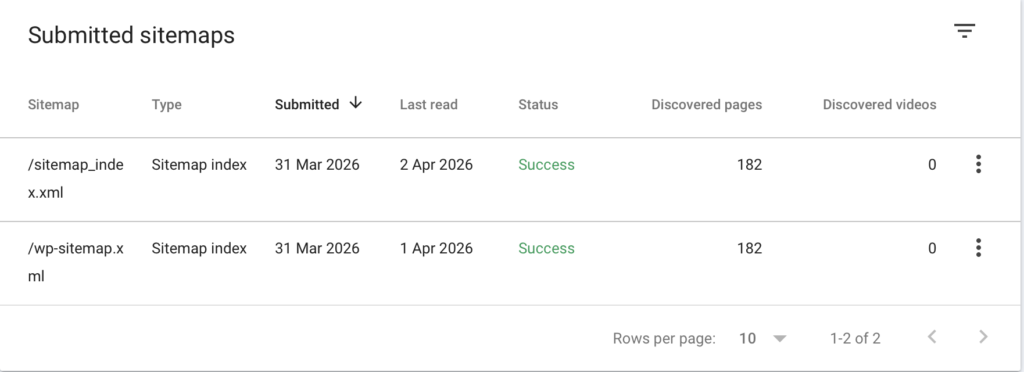
    Next, I submitted my sitemap:

    https://yourdomain.com/wp-sitemap.xml
    This tells Google:

    “Here are all my pages — go crawl them”

    why nobody is visiting your website sitemap setup

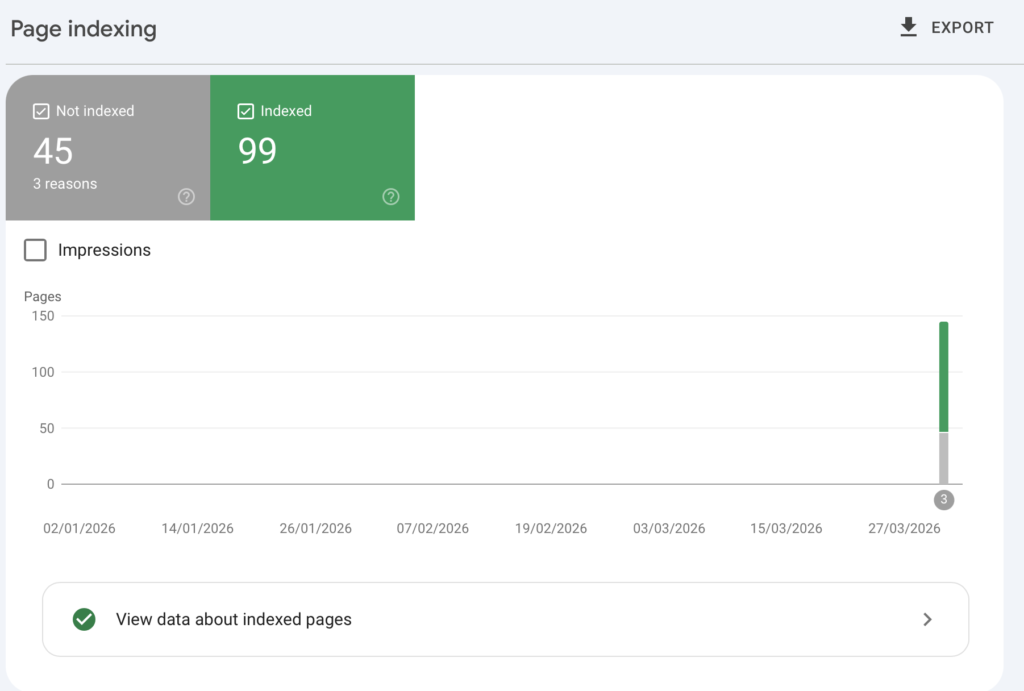
    3. Enabled IndexNow (Faster Indexing)

    I installed the IndexNow plugin in WordPress.

    This automatically:

    • Notifies search engines when content changes
    • Speeds up indexing

    No manual API setup needed — plugin handled everything.

    why nobody is visiting your website page index setup

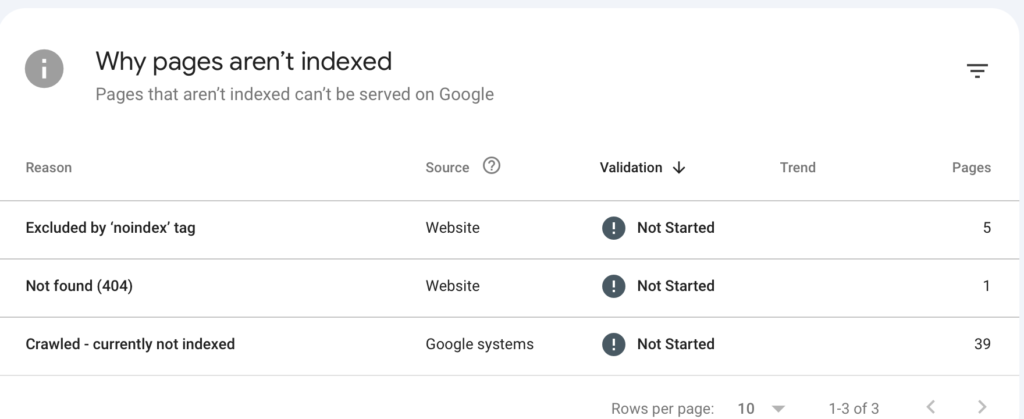
    If there is issue in indexing the pages, you also get to know about them.

    why nobody is visiting your website page indexing error information

    4. Connected Google Analytics

    I connected my site to Google Analytics using Rank Math.

    This allows me to:

    • Track visitors
    • See real-time users
    • Analyze traffic sources

    5. Requested Indexing Manually

    For my main blog post, I used:

    Google Search Console → URL Inspection → Request Indexing

    This speeds up the process for new content.

    Issues I Faced (And What I Learned)

    Crawled but not indexed

    Google crawled my pages but didn’t index them.

    Reason:

    • New website
    • Low authority
    • Limited content

    Tag pages not indexed

    I saw many URLs like:

    /tag/java/
    /tag/aws/
    These were intentionally set to noindex (which is correct)

    404 errors

    Some URLs like:

    /wp-content/uploads/*

    These are normal and harmless — no action needed.

    What Happened After Fixing It

    After setting everything up:

    • Google started crawling my site
    • Pages appeared in Search Console
    • Impressions slowly began

    No instant traffic — but clear progress

    How to Check If Your Website Is Indexed

    Once you have done all the required steps and configuration, you can quickly check if your website is visible on Google so that you can be assured that the steps you took actually worked.

    Method 1: Google Search

    Search:

    site:yourdomain.com

    If pages appear → your site is indexed.


    Method 2: Google Search Console

    Go to:
    Performance → check impressions

    • 0 impressions → not visible yet
    • Increasing impressions → Google is showing your site

    Visit Google Search Console to know more.


    Method 3: URL Inspection

    Paste your page URL and check:

    • Indexed → good
    • Not indexed → request indexing

    Key Lessons

    Here’s what I learned:

    1. Building a website ≠ Getting traffic

    You must make it discoverable.

    2. Setup is just the beginning

    Content is what drives growth.

    3. Don’t panic about indexing issues

    They’re normal for new sites.

    4. Focus on quality content

    Google indexes value — not just pages.

    What You Should Do Next

    If you’re starting a website:

    1. Set up Google Search Console
    2. Submit your sitemap
    3. Use IndexNow (if on WordPress)
    4. Connect Google Analytics
    5. Start publishing content consistently

    Final Thoughts

    This entire setup took me just a few hours — but it completely changed how my site behaves.

    Understanding why nobody is visiting your website is the first step towards fixing it and building real traffic.

    If you’re stuck at:

    “Why is my website not getting traffic?”

    Congratulations. Now you know why and you also know how to solve it.

    Good day to you 🫡.

    I’ve also shared my detailed Karat interview experience here.

  • Karat Interview Experience (2026) – Questions, Process & Tips

    Karat interview experience can be quite different from traditional interviews. In this article, I’ll share my Karat interview experience, including the questions asked, process, and tips to crack it.

    I had a Karat interview scheduled for a leading bank as online screening round. This is the first time I’m attending an interview that’s being conducted by a third party for a company.

    Got naturally interested on this process, I wanted to know more about how this interview is taken and started searching online. Guess what, I couldn’t find a single video explaining about the interview pattern and all I could find was interview experiences of people who attended interviews to work for Karat.

    So I decided to write this blog in the hope that this could be of help for someone to better prepare mentally for a Karat interview.

    Disclaimer: Their interview pattern might not be the same for all companies and the companies themselves also could have partnered with them to frame the question areas.

    P.S: Not revealing any questions I encountered to maintain ethics

    So following is their interview pattern

    • Introduction – 5 minutes
    • Technical questions – 10 minutes
    • Coding and debugging – 45 minutes

    Introduction

    This section is about both ways. The interviewer from Karat introduces about themselves and also explains about the interview pattern, which, you’re reading here, wink wink.

    And then you introduce about yourself and the request would be to do that in under 60 seconds.

    Technical Questions

    So this part of the interview is questions on basics and intermediate concepts in your programming language of choice and depending on the role you’re opting for.

    This section of the interview is a pretty much comfortable zone and you can complete this if you’re decently prepared.

    Coding and Debugging

    Now this is where things get interesting. This is not your regular, tell a program and you code it kind of a round. And this round tests how quick you’re with debugging and problem solving by assessing how many coding questions you’re able to solve in these 45 minutes.

    It typically starts with debugging. You will be presented with a code and the corresponding test cases already written and the question for you would be to identify why one of the test cases fail and what’s the issue with the code.

    And the intensity will get increased slowly asking to write logic for a test case that’s already written.

    This is how this round goes and this is where I stopped so I don’t have further visibility on whether they will actually ask you to write a code from scratch along with test cases.

    What I Liked

    Was how unbiased the questions were and also how it focused more on your problem solving and critical thinking side rather than if you remember the syntax.

    And the interviewer. OMG, they were really calm and composed and gave clarity right before the start of the interview on how the rounds will be.

    They will also support you midway of the coding round if you need any guidance.

    What I didn’t like

    Was the lack of guidance online about the interview pattern which is not the case anymore, wink wink.

    I hope this post might have given you some insights on what to expect from your Karat interview that’s scheduled real soon and how prepared you should be both technically and mentally.

    Go get it. Good day to you 🫡.

  • Debugging Wireless Mouse Lag with USB-C Hub — A Small Issue That Turned Into a Good Learning

    Recently I ran into a strange issue with my setup that looked simple at first, but ended up teaching me a lot about wireless interference, USB hubs, and how small hardware changes can affect system behavior.

    I use a Mac with an external monitor connected through a USB-C HDMI hub, along with a wireless mouse that uses a 2.4 GHz USB receiver. For a long time everything worked fine with my office laptop, but after switching adapters I started noticing random mouse lag and stuttering.

    At first it looked like a minor problem, but the behavior was inconsistent, which made it interesting to debug.

    The problem

    The mouse pointer would randomly lag or stutter, especially when the receiver was connected through the HDMI dongle.

    Things I noticed:

    • Mouse works fine when plugged directly into laptop
    • Lag appears when using USB-C HDMI hub
    • Issue happens only sometimes
    • Dell adapter worked perfectly before
    • New adapters (even slightly expensive ones) showed lag

    This suggested the mouse itself was not the problem.

    Initial assumptions

    My first guesses were:

    • Bad HDMI hub
    • Cheap adapter issue
    • macOS driver problem
    • Mouse hardware problem

    So I tried:

    • Different HDMI dongles
    • Different USB ports
    • Different mouse positions

    The issue still appeared.

    That meant the problem was probably environmental, not just hardware quality.

    Key observation — Dell adapter never had this problem

    With my work laptop I was using a Dell DA20 USB-C adapter, and I never faced any lag.

    Differences between that setup and my current one:

    • Dell adapter was plastic body
    • New adapters were metal body
    • Router was placed on my desk
    • Mouse receiver connected to hub instead of laptop

    This made me suspect wireless interference.

    Understanding 2.4 GHz interference

    Most wireless mice use 2.4 GHz receivers.

    Wi-Fi routers also use:

    • 2.4 GHz
    • 5 GHz

    USB 3.0 ports are also known to emit noise around 2.4 GHz.

    When all of these are close together, interference can happen.

    In my case, I had:

    • Router on the desk
    • USB-C hub with HDMI + USB3
    • Metal adapter body
    • Mouse receiver plugged into hub

    This is almost the perfect setup for signal interference.

    Why metal adapters can make it worse

    Metal hubs are not bad by themselves, but cheaper ones may have poor shielding.

    Possible issues:

    • RF signal reflection
    • USB3 noise leakage
    • Poor grounding
    • Weak isolation between ports

    Enterprise adapters like Dell docks usually have better internal design, which explains why the Dell adapter worked fine.

    Attempted fix — USB extension cable

    One common solution suggested online is using a USB extension cable to move the receiver away from the hub.

    Reason:

    • Moves receiver away from noise source
    • Reduces interference from USB3 / HDMI
    • Improves signal strength

    I ordered one to test this.

    Final fix — moving the Wi-Fi router

    Before the extension cable arrived, I moved my Wi-Fi router back to its original place in the hall instead of keeping it on my desk.

    Immediately, the mouse lag disappeared.

    No adapter change.
    No mouse change.
    No software change.

    Just moving the router fixed the issue.

    This confirmed the root cause was wireless interference.

    What I learned from this

    This small issue reinforced a few important debugging lessons:

    1. Change one variable at a time
    2. Compare with a known good setup
    3. Environment matters as much as hardware
    4. Expensive accessories don’t always fix the problem
    5. Wireless interference is very real in modern setups

    It also reminded me that real-world engineering problems are often about systems interacting, not just one component failing.

    Final setup that worked

    • Router moved away from desk
    • USB receiver not blocked by hub
    • Using existing HDMI dongle
    • No need for expensive adapter

    Simple fix, but good learning.

    Conclusion

    This started as a minor mouse lag issue, but turned into a useful reminder about RF interference, USB3 noise, and systematic debugging.

    Sometimes the best solution is not buying new hardware, but understanding how the current setup behaves.

    And those small debugging experiences often teach more than big projects.

  • My mission..

    What is your mission?

    #InnerPeace

    My mission, is to, stay humble, happy and at peace.

    Good day to you🫡.

  • Future, now..

    Do you spend more time thinking about the future or the past? Why?

    #FutureNowPastThen

    There was a time, past seemed important.

    But it’s always present and future now.

    Future is where we’re heading into, and it’s nothing wrong to plan how it should be.

    But, present is equally important than future so failing to live in it doesn’t make sense.

    Need to find the right balance.

    Good day to you🫡.

  • Beautiful inside but..

    What does it mean to be a kid at heart?

    #BeautifulClown

    At first glimpse, I could say, it means to be an innocent and a beautiful mind.

    But the more you behave the same way, speaking without filtering, then soon you’ll realize that it brings more harm to you than anything outside.

    It’s literally you ruining every good things that’s bound to happen to you.

    So be a kid at heart, only to kids and be an adult to adults.

    Don’t be a clown. Good day to you 🫡.

  • Own multiple..

    What’s something you would attempt if you were guaranteed not to fail.

    #MultipleBasketsForEgg

    Own multiple business ventures.

    This has always been my dream and if someone guarantees that I won’t fail in it, then what else do I need other than that.

    Good day to you🫡.

  • Independence..

    What was the hardest personal goal you’ve set for yourself?

    #FinancialIndependence

    At 40, I need to be financially independent of my current anxieties and worries.

    It’s a hard personal goal, considering where I am financially today. But, we need to dream big to achieve half of it right?.

    Good day to you 🫡.